





Microsoft’s Major Shift: A New Era of User Control in Windows 11 and Its Impact on 1 Billion Users
Microsoft has recently initiated a monumental transformation within the Windows 11 ecosystem that is set to fundamentally change how people interact with their personal computers. According to recent reports from major tech outlets like Forbes and Thurrott, Microsoft is finally granting its massive user base of over one billion people the autonomy they have been demanding since the early days of the operating system. This change primarily revolves around the Windows Update mechanism and system power options, addressing a long-standing frustration shared by millions. For decades, Windows users have been plagued by the unavoidable “Update and Shutdown” or “Update and Restart” commands at the most inconvenient times, such as when rushing to a meeting or finishing a long day of work. In a significant departure from its previous rigid policies, Microsoft is now prioritizing user experience and personal choice by introducing a more flexible and respectful approach to system maintenance.
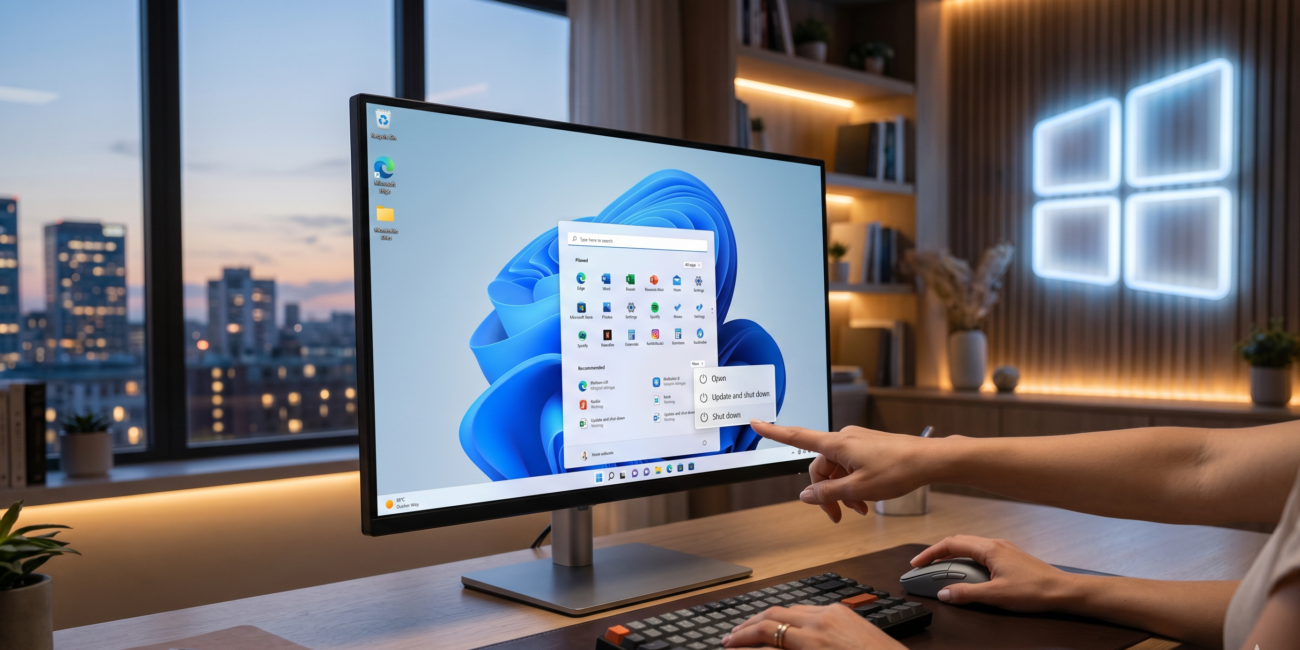
To understand the depth of this change, one must look at the traditional Windows update model which prioritized mandatory security. In previous versions, Microsoft’s primary focus was ensuring that every machine remained up-to-date to mitigate global security risks. While noble in intent, this resulted in a forceful update process that left users with virtually no choice but to wait for installation bars to finish. However, in this 2026 vision, Microsoft has acknowledged that every user’s situation is unique and time-sensitive. Following the latest Windows 11 rollout, the power menu will now display distinct options. Even if a system has downloaded a pending update, users will see a standard “Shutdown” or “Restart” option alongside the update-specific ones. This means if you are catching a flight or your laptop is running dangerously low on battery, you can turn off your device instantly without being held hostage by a progress screen. This shift signals Microsoft’s transition from a rigid service provider to an empowering tool that respects the user’s schedule.
This entire overhaul is driven by extensive data analysis and a deep dive into user sentiment. The company reportedly analyzed over seven thousand unique feedback categories, where “Control” emerged as the most significant pain point for the community. Users repeatedly questioned why they lacked the basic right to decide when their own hardware—which they purchased—should perform heavy tasks like updating. According to reports from Paul Thurrott, Microsoft is even testing an “Indefinite Pause” feature. Previously, Windows updates could only be delayed for up to 35 days before the system eventually forced the installation. The new policy aims to allow users to extend this pause much further, providing the freedom to skip updates for months if their specific workflow requires absolute stability. While this might seem like a security risk, Microsoft believes that a frustrated user avoids updates out of spite or fear, whereas an empowered user will choose to update at a more convenient, safer time.
Another critical element of this new strategy is “Update Consolidation.” Microsoft has realized that the frequent “nagging” from small, individual updates creates a negative perception of the OS. Whether it is a minor driver patch or a .NET framework fix, the constant requirement for a system reboot disrupts productivity. Under the new framework, Microsoft intends to group various types of updates into a single “Bucket.” The goal is to move toward a system where a user only needs to restart their computer once a month for a comprehensive update package rather than multiple times a week. This is a massive boon for professionals in creative fields, developers, and researchers who rely on long uptimes for rendering or complex computations. By reducing the frequency of reboots, Microsoft is not only boosting user productivity but also reducing the physical stress on hardware components caused by constant power cycling.
The Forbes report highlights that this change is not just about convenience but is a calculated move in a competitive market. As alternative operating systems like macOS and Linux become increasingly user-centric, Microsoft must evolve to retain its one billion active users. Windows has often been perceived as an overbearing system that dictates terms to the user, but this new policy positions it as a supportive partner. This shift is expected to strengthen Microsoft’s standing in the corporate sector as well, where unexpected downtime caused by forced updates can result in significant financial losses. The new policy provides IT administrators with much-needed flexibility to schedule maintenance windows that align perfectly with business operations rather than fighting against an automated system.
Naturally, such a drastic change brings up concerns regarding cybersecurity. The primary question remains: will the ability to postpone updates indefinitely leave systems vulnerable to zero-day exploits and malware? Microsoft’s solution involves the implementation of “Smart Notifications.” Instead of intrusive pop-ups that interrupt work, the system will use subtle, informative cues to explain the importance of specific updates. These notifications will distinguish between critical security patches and optional feature improvements, allowing users to make informed decisions. It is a trust-based model where the company builds a more mature relationship with the user. If a user neglects a vital update for too long, the system will provide persistent reminders, but it will no longer resort to the “Nuclear Option” of forcing an automatic restart in the middle of an active session.
The impact of this update will be felt most significantly by those running Windows 11 on older or mid-range hardware. On these machines, update installations often take a considerable amount of time and can temporarily slow down system performance. For these users, the option to simply shut down without updating is a massive relief. Furthermore, Microsoft has improved its “Update Delivery Optimization” technology to ensure that background downloads do not hog internet bandwidth or CPU cycles. The system will quietly prepare the files in the background and only notify the user through the power menu when everything is ready. The user then retains the ultimate power to decide whether to install it immediately or wait for a more appropriate time, such as a weekend.
In conclusion, Microsoft’s decision marks a milestone in the history of the Windows operating system. It represents more than just a software patch; it is a fundamental shift in corporate philosophy. The company has finally recognized that in the digital age, a user’s time and agency are the most valuable assets. Implementing this across a billion devices is a complex challenge, but if successful, it will solidify Windows 11 as the most user-friendly version of the OS to date. As these features roll out to the general public in the coming months, we will see a significant shift in user satisfaction. Microsoft has effectively returned the original meaning to the “Shutdown” and “Restart” buttons, ensuring that your computer works for you, and not the other way around.