




Samsung One UI 9: The Dawn of a Refined and Intelligent Ecosystem
The landscape of mobile operating systems is one of constant evolution, where the balance between feature density and user interface elegance is perpetually shifting. With the recent leaks surrounding Samsung’s upcoming One UI 9, it has become evident that the South Korean tech giant is pivoting toward a philosophy of “sophisticated minimalism.” While previous iterations of One UI focused heavily on adding a multitude of features to compete with the sheer versatility of Android, One UI 9 appears to be a deliberate step toward refinement, trimming away the visual “fat” while injecting deeper, more intuitive artificial intelligence into the core experience. This update, based on the foundation of Android 17, represents not just a version increment but a strategic overhaul of how users interact with their Galaxy devices.
The Evolution of the Settings Interface
One of the most immediate and striking changes discovered in the early builds of One UI 9 is the total reimagining of the Settings menu. For years, the Settings application in One UI has been a dense forest of options, often criticized for being overwhelming to the average user. The leaked details suggest a significant shift in design language, specifically targeting the search functionality and the organizational structure of device information.
The new search bar within the Settings app is no longer a static element. It now incorporates advanced “elastic” animations that react dynamically to user touch. When a user taps into the search field, the bar expands with a fluid, physics-based motion that feels more integrated into the software’s architecture. This is part of a broader effort by Samsung to make the interface feel “alive” and responsive. Beyond the aesthetics, the search logic itself has been bolstered by AI, allowing it to understand natural language queries more effectively. Instead of needing to remember the exact name of a sub-menu, users can type intent-based phrases, and the system will accurately predict the desired destination.
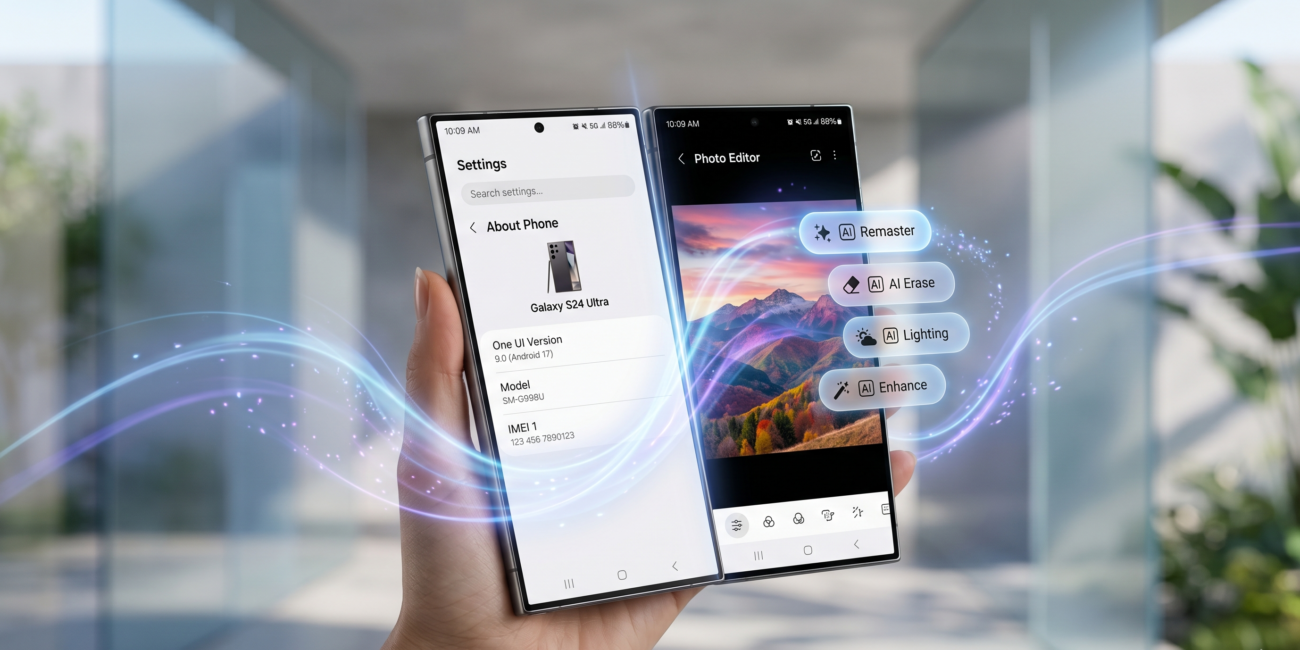
Furthermore, the “About Phone” section, which has remained largely unchanged for several generations, is undergoing a drastic “diet.” In current versions, this screen is dominated by a large, high-resolution render of the device being used. While visually appealing, this image occupies valuable screen real estate. In One UI 9, Samsung has opted for a much smaller device icon tucked into the top-left corner. This adjustment allows for a more information-dense layout where the device name, model number, and serial number are presented in a clear, side-by-side format. This change reflects a broader trend in One UI 9: the removal of decorative elements in favor of functional clarity.
Transforming Photography with Contextual AI
Samsung has long been a leader in mobile photography, but the complexity of post-processing tools has often meant that powerful editing features go unused by the majority of consumers. One UI 9 aims to bridge this gap through the introduction of “Smart Suggestion Pills” within the native Gallery and Photo Editor apps. These pills are dynamic UI elements that appear at the top of the editing interface, offering one-tap solutions based on the specific content of the photo being viewed.
The underlying AI engine analyzes the metadata and visual composition of an image in real-time. If the system detects a distracting object in the background of a portrait, a “Remove Object” pill will appear. If a landscape photo suffers from poor dynamic range, a “Remaster” or “Sky Enhancement” pill becomes the primary suggestion. This move moves the editor away from a menu-driven experience toward a proactive, assistive one. By placing these tools directly in the user’s line of sight without requiring them to dig through layers of sub-menus, Samsung is democratizing high-end photo editing for the casual user.
A New Language of Animation and Smoothness
While static screenshots can convey layout changes, they fail to capture what is arguably the most significant upgrade in One UI 9: the animation engine. Samsung has reportedly rewritten large portions of its gesture navigation and window management code to ensure that every interaction feels frictionless. The goal is to match or exceed the legendary smoothness associated with iOS while maintaining the customizability of Android.
The leaks highlight a new “non-linear” animation style where windows and icons don’t just move from point A to point B but follow natural curves and momentum. This is particularly noticeable when exiting applications or switching between tasks. The “elasticity” mentioned in the Settings search bar is a system-wide philosophy. When a user reaches the end of a scrollable list, the content stretches and snaps back with a tactile feel. These micro-interactions are designed to reduce the “robotic” feel of digital interfaces, making the software feel like a physical extension of the hardware.
Streamlining the Visual Workspace
The philosophy of “trimming the fat” extends deep into the system’s typography and iconography. In One UI 9, Samsung is removing much of the descriptive subtext that sits beneath primary menu items. The rationale is that as users become more familiar with the One UI ecosystem, they no longer need “training wheels” in the form of explanatory sentences for every toggle. This results in a much cleaner, more vertical layout that requires less scrolling and feels less cluttered.
The Display settings are also seeing a significant overhaul. In previous versions, choosing between Light and Dark mode involved selecting between two small, static cards. One UI 9 replaces this with full-screen previews. When toggling between modes, the entire background of the settings page transitions, giving the user an immediate and immersive preview of how the change will affect the overall look of their device. This is complemented by deeper integration with Android 17’s Material You color palettes, ensuring that system accents, buttons, and icons harmonize perfectly with the user’s chosen wallpaper.
Connectivity and the Future of Sharing
Beyond the visual and interactive elements, One UI 9 is set to introduce a more seamless way to move data between devices. While “Quick Share” has been Samsung’s answer to file sharing for years, One UI 9 introduces a “Tap to Share” mechanic. This feature leverages ultra-wideband (UWB) technology and NFC to allow users to initiate a file transfer by literally tapping the top of their phone against another Galaxy device. This physical gesture removes the friction of searching through a list of nearby devices and waiting for a handshake connection.
This focus on connectivity is part of a larger push to make the Samsung ecosystem feel more unified. Whether it is moving a browser tab from a phone to a tablet or using a Galaxy Watch to unlock a secure folder on a smartphone, One UI 9 acts as the glue that binds these hardware components together. The update also hints at expanded “Multi-Control” features, allowing users to use their smartphone as a secondary input device for their Galaxy Book laptop with even lower latency than before.
Accessibility and Inclusive Design
A core pillar of One UI has always been accessibility, and One UI 9 continues this tradition with several innovative features designed for users with varying needs. One of the most talked-about additions is the “Tap Indicator” system. When enabled, this feature detects when a user is struggling to read a specific piece of text or interact with a small UI element. It can then automatically launch a “loupe” or a separate magnification window that highlights and enlarges the area under the user’s finger.
Additionally, Samsung is expanding support for physical peripherals. As more users turn to foldable devices like the Galaxy Z Fold series for productivity, the need for robust keyboard and mouse support has grown. One UI 9 introduces a suite of new physical keyboard shortcuts and better cursor customization, making the transition from a mobile interface to a desktop-like experience (DeX) feel more consistent.
The Road Ahead
The leaks surrounding One UI 9 paint a picture of a company that is confident in its identity. Samsung is no longer just chasing the latest trends; it is refining its own vision of what a mobile interface should be. By focusing on animations, AI-driven utility, and a cleaner aesthetic, One UI 9 aims to provide an experience that is both powerful for enthusiasts and approachable for newcomers.
While the official release is still a significant time away—likely coinciding with the mid-2026 launch of Samsung’s next generation of foldables—the current glimpses into the software suggest that the wait will be worth it. As the beta programs eventually open, the tech world will be watching closely to see if this “minimalist” approach can truly redefine the Galaxy experience. One UI 9 is not just a software update; it is a statement of intent for the future of mobile interaction.

Other Articles

AOL Outage Disrupts Email Services for Thousands Worldwide